

Holochain Integration
Flowsta is built on Holochain, providing true zero-knowledge architecture and decentralized identity.
Holochain Powers Flowsta
Flowsta uses Holochain as the foundation for its zero-knowledge authentication system. All user private data is stored on Holochain's distributed hash table (DHT), encrypted client-side so that even Flowsta cannot access it.
What Holochain Enables
| Feature | How Holochain Helps |
|---|---|
| Zero-Knowledge Storage | User data encrypted and stored on DHT - Flowsta staff physically cannot access it |
| Decentralized Identity | Each user has an agent public key that serves as their cryptographic identity |
| W3C DIDs | User identities are W3C Decentralized Identifiers (DIDs) anchored to Holochain |
| Censorship Resistance | No central authority can revoke or modify user identities |
| Data Portability | Users own their data and can export it anytime |
Architecture Overview
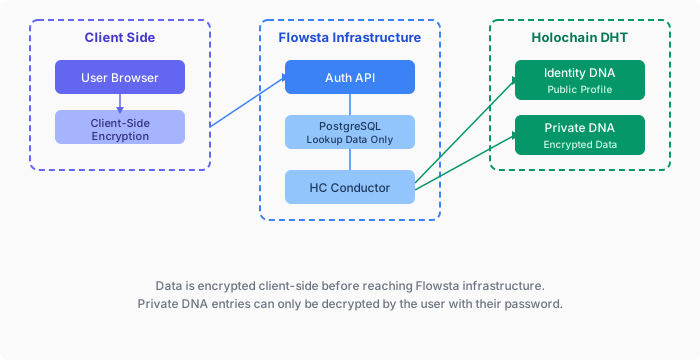
Two Holochain DNAs
Flowsta uses two separate Holochain DNAs:
Identity DNA (Public)
- Display name, profile picture
- Public agent key
- Publicly readable by other users
Private DNA (Encrypted)
- Email (encrypted)
- Recovery phrase (encrypted)
- Session data (encrypted)
- OAuth activity logs
- Only readable by the user who created it
Zero-Knowledge Guarantee
All data in the Private DNA is encrypted with keys derived from the user's password. Flowsta servers never see the unencrypted data or the encryption keys.
For Holochain Developers
If you're building a Holochain application, you have two options for integrating with Flowsta:
Option 1: Use Flowsta for Authentication Only
Use Flowsta's OAuth system for user authentication, but manage your own Holochain agent keys:
import { FlowstaAuth } from '@flowsta/auth';

const auth = new FlowstaAuth({
  clientId: 'your-client-id',
  redirectUri: 'https://yourapp.com/callback',
  scopes: ['openid', 'public_key', 'did'] // Get user identity, not signing
});

// User authenticates
const user = await auth.handleCallback();

// Use their Flowsta identity but your own Holochain keys
console.log('User DID:', user.did);
console.log('User agent key (Flowsta):', user.agentPubKey);

// Your app can generate its own agent key for the user
// or use the Flowsta key as an identifierThis approach:
- ✅ Gives users a consistent identity across apps
- ✅ You control your own Holochain infrastructure
- ✅ No dependency on Flowsta for signing
Option 2: Link Agent Identity via Flowsta Vault
Let users prove their Flowsta identity on your DHT using the flowsta-agent-linking crate and Flowsta Vault:
import { linkFlowstaIdentity } from '@flowsta/holochain';

const result = await linkFlowstaIdentity({
  appName: 'YourApp',
  clientId: 'your-client-id', // from dev.flowsta.com
  localAgentPubKey: myAgentKey, // uhCAk... format
});

// Commit attestation to your DHT
await appWebsocket.callZome({
  role_name: 'my-role',
  zome_name: 'agent_linking',
  fn_name: 'create_external_link',
  payload: {
    external_agent: decodeHashFromBase64(result.payload.vaultAgentPubKey),
    external_signature: base64ToSignature(result.payload.vaultSignature),
  },
});This approach:
- ✅ Users' private keys never leave their device (Flowsta Vault)
- ✅ No shared DNA or API dependency required
- ✅ Anyone on your DHT can verify the identity via Ed25519 cryptography
- ✅ Works across separate Holochain conductors
Decentralized Identity Verification
Agent linking creates an IsSamePersonEntry attestation on your DHT with cryptographic signatures from both agent keys. No central authority is needed to verify the link.
→ Learn more about Agent Linking
For Non-Holochain Developers
You don't need to know anything about Holochain to use Flowsta! The standard OAuth integration works like any other identity provider:
import { FlowstaAuth } from '@flowsta/auth';

const auth = new FlowstaAuth({
  clientId: 'your-client-id',
  redirectUri: 'https://yourapp.com/callback',
  scopes: ['openid', 'email', 'display_name']
});

// Standard OAuth flow
auth.login();

// Get user info
const user = await auth.handleCallback();
console.log('User:', user.displayName, user.email);Holochain runs behind the scenes to provide zero-knowledge data storage, but you interact with Flowsta through standard OAuth 2.0.
Next Steps
- Agent Linking - Link Holochain agent identities via Flowsta Vault
- SDK Reference - Full @flowsta/auth documentation
- OAuth Flow - Understand the authentication flow
- API Reference - REST API endpoints
Learn More About Holochain
- Holochain.org - Official Holochain website
- Holochain Developer Portal - Build on Holochain
- Holochain Forum - Community discussions