

Desktop App Authentication
Identity for desktop apps through Flowsta Vault - your app never touches a credential.
Desktop apps (Tauri, Electron, or anything that can reach localhost) talk to the user's Flowsta Vault over local IPC at http://127.0.0.1:27777. The user sets up and unlocks their Vault in the Vault app itself - your app only ever observes Vault state and asks it to sign things. There is no password to collect, store, or leak.
How It Works
Unlike web OAuth, there's no browser redirect. Your app calls the Vault's local IPC; the Vault shows the user exactly what your app is asking for and signs with keys that never leave the device.
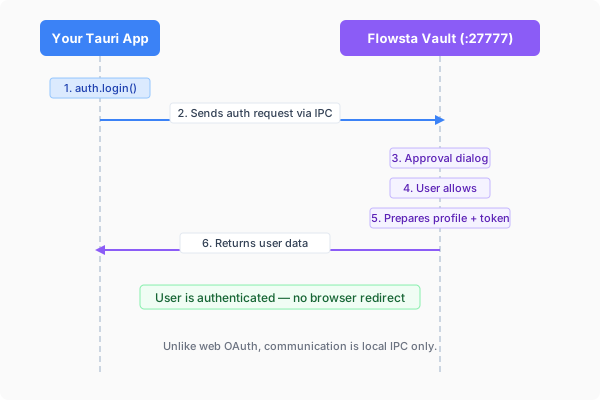
Your app ──local IPC──▶ Flowsta Vault ──signature──▶ your app
(user approves in Vault UI)::: caution Native (non-webview) IPC clients If your app calls the Vault from native code (Rust reqwest, Go, Python, …) instead of a webview, you must send an Origin header manually on every request - browsers add it automatically, native HTTP clients don't. See the Origin-header caution in the IPC reference. :::
Quick Start
1. Install the SDK
npm install @flowsta/holochain2. Check Vault Status
import { getVaultStatus } from '@flowsta/holochain';

const status = await getVaultStatus();
if (!status.running) {
  showMessage('Please install and open Flowsta Vault');
  return;
}
if (!status.unlocked) {
  showMessage('Please unlock Flowsta Vault to continue');
  return;
}

console.log('DID:', status.did);
console.log('Agent key:', status.agentPubKey);
// With display_name / profile_picture scopes granted at dev.flowsta.com:
console.log('Name:', status.displayName);The user unlocks the Vault in the Vault's own window - never in yours.
3. Sign the user in
Ask your backend for a challenge, have the Vault sign it, and exchange the signature for a session:
import { authenticateWithVault } from '@flowsta/holochain';

// 1. Get a challenge from the Flowsta API
const { challenge } = await fetch(
  'https://auth-api.flowsta.com/auth/vault/challenge',
  { method: 'POST', headers: { 'Content-Type': 'application/json' },
    body: JSON.stringify({ client_id: YOUR_CLIENT_ID }) }
).then(r => r.json());

// 2. The Vault signs it locally (user approves in the Vault UI)
const { signature, agentPubKey } = await authenticateWithVault(challenge);

// 3. Exchange for a session token
const { token, user } = await fetch(
  'https://auth-api.flowsta.com/auth/vault/token',
  { method: 'POST', headers: { 'Content-Type': 'application/json' },
    body: JSON.stringify({ challenge, signature, agent_pub_key: agentPubKey }) }
).then(r => r.json());No password ever existed in this flow - the user's device key is the account's authentication.
What else the Vault does for your app
| Capability | SDK function | Docs |
|---|---|---|
| Link your app's Holochain agent to the user's identity | linkFlowstaIdentity() | Agent Linking |
| Sign documents/files with the user's identity | signDocument() | @flowsta/holochain SDK |
| Automatic encrypted backups of your app's data | startAutoBackup() | Backups |
| Restore after reinstall | restoreFromVault() | Reinstall recovery |
Error Handling
import {
  VaultNotFoundError,
  VaultLockedError,
  UserDeniedError,
} from '@flowsta/holochain';

try {
  const result = await authenticateWithVault(challenge);
} catch (error) {
  if (error instanceof VaultNotFoundError) {
    showMessage('Flowsta Vault is not running - please open it');
  } else if (error instanceof VaultLockedError) {
    showMessage('Please unlock Flowsta Vault');
  } else if (error instanceof UserDeniedError) {
    showMessage('Sign-in was declined in the Vault');
  }
}Web vs Desktop Auth
| Feature | Web (@flowsta/auth) | Desktop (@flowsta/holochain) |
|---|---|---|
| Auth method | Browser redirect to login.flowsta.com | Local Vault IPC |
| User approval | OAuth consent screen | Directly in the Vault UI |
| Credentials in your app | Never | Never |
| Client secret | Not needed (PKCE) | Not needed (local signatures) |
| Requires Vault | No (relay/deep-link supported) | Yes |
Next Steps
- @flowsta/holochain SDK - Full SDK reference
- Agent Linking - Link identities on Holochain
- Vault Overview - How Flowsta Vault works
- IPC Endpoints - Raw IPC API reference